Free invoice generator
Fill in your details, pick one of three invoice templates and download a PDF. Free, no signup, and your business details stay on this device.
Your details are saved in this browser only. Save a data file to keep a copy or move to another device.
How to make an invoice
- 1
Choose a template
Pick your country and the Classic, Modern or Minimal invoice template. The currency, tax name and date style follow the country.
- 2
Fill in the details
Add your business, your customer and each item with its quantity and price. The totals and tax add up as you type.
- 3
Download the PDF
Check the preview and tap Download PDF. Next invoice starts the next one with your details and the next number.
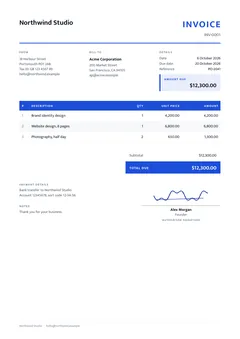
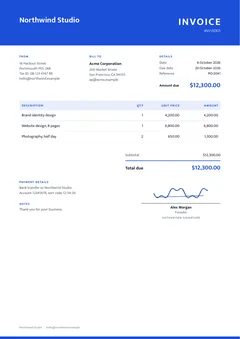
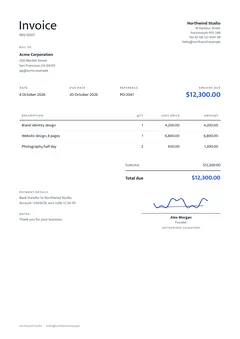
Three free invoice templates
Each template holds the same details, so you can switch at any time, even after filling everything in. Pick one of six colours to match your brand.
Invoice, quotation, estimate or proforma?
| Invoice | Asks for payment for work done or goods delivered. It has a due date and the total due. |
|---|---|
| Quotation | A fixed price offered before the work starts, valid until a date. In the US it is often called a quote. Make one with the quotation generator. |
| Estimate | An expected price that can change, common for repairs and building work. Also valid until a date. Make one with the estimate generator. |
| Proforma invoice | A preview of the final invoice, sent before delivery so the customer can arrange payment, an import permit or a letter of credit. It is not a demand for payment. Make one with the proforma invoice generator. |
To turn an accepted quotation into an invoice, change Document to Invoice. The items stay, and the number changes from QUO to INV.
What to put on an invoice
The invoice format is much the same everywhere: your name and address, the customer's name, a unique invoice number, the date, what you sold with quantities and prices, the tax and the total. The Country setting adds the local details:
| Nepal | Amounts in rupees with lakh and crore grouping (1,00,000), your PAN or VAT number, the Nepali date (BS) next to the AD date, the total in words and a signature line. VAT-registered sellers charge 13% VAT. |
|---|---|
| United States | Dollars, US Letter paper and month-first dates. Add sales tax only where your state requires it, as a percentage on each item. |
| United Kingdom | Pounds and 20% VAT. VAT-registered businesses show their VAT number. |
| European Union | Euros, your VAT ID and your customer's. For a business customer in another EU country, tick Reverse charge: the invoice shows no VAT and says the customer accounts for it. |
| Germany, small business | Adds the note that no VAT is charged under § 19 UStG, the Kleinunternehmerregelung. |
Good to know
| Nepali text | Names, addresses and items in Nepali Unicode print correctly in the PDF and stay searchable. To type Nepali on an English keyboard, use Nepali typing. |
|---|---|
| VAT bills in Nepal | Businesses with a turnover above Rs 20 crore must issue invoices from IRD-certified billing software. If you are registered for VAT, ask the IRD or your tax adviser before using a PDF from any generator as your VAT bill. Quotations, proforma invoices and invoices to clients abroad are fine. |
| E-invoices in Germany | Businesses in Germany must be able to receive e-invoices (XRechnung or ZUGFeRD), and most will have to send them from 2027 or 2028. A PDF is not an e-invoice. Small businesses under § 19 UStG may keep sending PDFs. |
| Your saved details | They stay in this browser until you clear its data. Safari can remove them from sites you haven't visited for 7 days, so save a data file now and then. |
| Signing | The signature is a picture of your signature on the PDF, which is how most invoices are signed. It is not a digital certificate. To sign another document, use Sign PDF. |
Privacy: how this tool handles your business details
When you use Invoice generator, your browser reads your business details on your device and the tool's code does the work in this tab. PageYak's server only sends the page and its code. It never receives your business details, so there is nothing to delete afterwards.
How PageYak works explains this in more detail.
Questions
Is the invoice generator free?
Yes. It is free with no signup, no watermark and no limit on the number of invoices.
Where are my invoice details stored?
In this browser on this device, so the form is filled in when you come back. They are never sent to PageYak. Save data file downloads a copy you can open on another device or keep as a backup.
Which invoice template should I use?
Classic suits most businesses and looks at home in accounts departments. Modern stands out, especially with your logo in the header. Minimal is calm and simple, popular with designers and consultants. They all hold the same details, so try each one in the preview.
Can I make a quotation or an estimate?
Yes. Choose Quotation or Estimate under Document, or open the quotation generator or estimate generator. The PDF shows a Valid until date instead of a due date, and the total is not called a total due.
Can I write the invoice in Nepali?
Yes. Type or paste Nepali in Unicode anywhere in the form. The PDF uses the Mukta font, so the letters join correctly and the text can be copied and searched. The headings stay in English.
How do I add VAT or sales tax?
Type the tax rate in each item's tax box, or set Tax % for new items under Currency, tax and layout. Items with different rates are added up separately, and the PDF shows the tax for each rate.
Can I sign the invoice?
Yes. Under Signature, type your name to have it written in a handwriting style, draw your signature with a finger or the mouse, or upload a photo of it (the white paper is removed). By hand leaves a blank line to sign after printing. Your name and title can go under the line.
Can I add my logo and a payment QR code?
Yes. Add a logo at the top and a picture of your payment QR code next to the payment details. PNG, JPG, WebP, GIF and iPhone HEIC pictures work.
Related tools
Last updated 6 October 2026.